Skip to content
What's new

Changelog

New features, quiet fixes, and everything in between.

September 30, 2026

Integrations, projects & domain fixes

Improvements

  • Stricter access checks for Zapier, Make, Telegram, HubSpot, and lead lists
  • Transferring, duplicating, or restoring a project now tells you exactly why it failed

Bug fixing

  • Fixed leads from an unknown form still reaching the CRM of an offline project
  • Fixed Brevo showing its old name and linking to sendinblue.com
  • Fixed generated React sections failing to build
  • Fixed generated sections loading late or not appearing on the page
  • Fixed project transfer failing
  • Fixed custom domains occasionally showing a 404 page
  • Fixed Meta flagging the click ID sent through the Conversions API
  • Fixed several billing issues
August 20, 2026

Editor, forms & AI chat fixes

Improvements

  • Password protection settings got a round of visual and usability polish
  • The AI chat now shows its plan steps in plain language
  • When an AI run fails, the chat now tells you clearly what went wrong
  • Polished the AI chat interface for generated sections
  • The domain check now spots leftover IPv6 records that send visitors to your old host

Bug fixing

  • Fixed custom text size on mobile — the control no longer sits off-screen
  • Fixed scrolling in the media library folder list
  • Fixed a grey background around Before/After elements with shadows
  • Fixed page previews overlapping inside folders in the Pages panel
  • Fixed the header menu wrapping into two columns when you zoom in
  • Fixed a form button inside a slider breaking the page layout
  • Fixed uploaded custom fonts not saving when applied from the text toolbar
  • Fixed Custom Code JavaScript not running when third-party content is blocked
  • Fixed the phone field losing its flag and country detection with some default values
  • Fixed pages scrolling to the bottom on their own when opened from Meta ads
  • Fixed publishing being blocked after you confirmed your email in another tab
  • Fixed a custom email sender not showing as connected when opened from the CRM
  • Fixed Ukrainian translations in Analytics
  • Fixed several issues with plan changes and billing
July 30, 2026

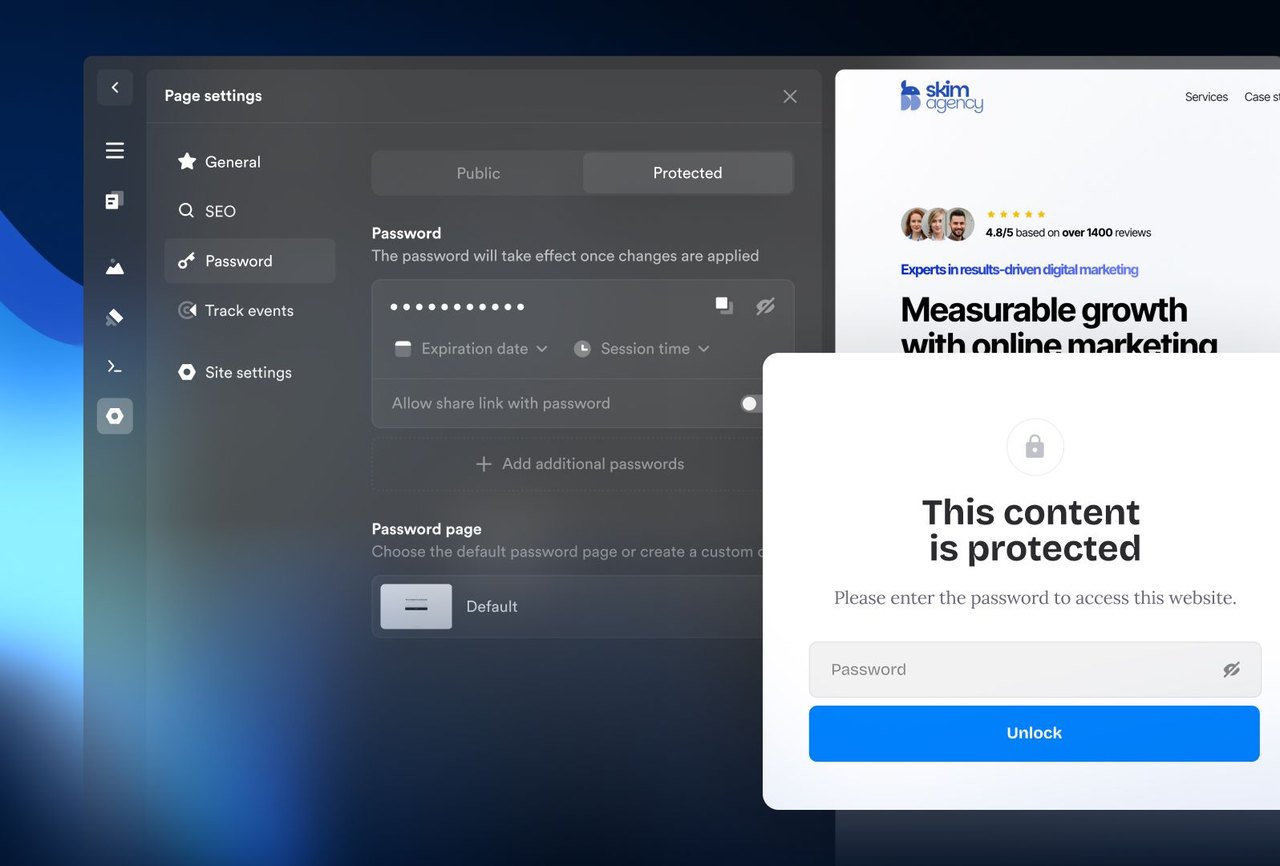
Password protection

Password protection

New features

  • Password protection - Lock your entire site or individual pages behind a password — for client previews, course content, or drafts
  • Two protection modes - Protect the whole site with one set of passwords, or pick specific pages, each with its own
  • Per-password settings - Give every password its own label, expiration date, and session length
  • Quick protect while publishing - Set a password right from the publish bar with the key icon
  • Share links - Send a link that unlocks the page automatically — no typing needed
  • Custom unlock pages - Design your own unlock page with the new Password input element, or use the clean default in six languages
  • Session length - Decide how long visitors stay unlocked — 1 day, 7 days, 30 days, or unlimited
  • Multiple passwords - Hand each client or cohort their own labeled password, on Advanced plans
  • Access history - See who unlocked, when, and from where — per password, on Advanced plans
  • Leads from unlocks - Collect email, phone, or name on the unlock form and send every unlock to your CRM, on Advanced plans
  • Instant effect - Passwords apply to your live site immediately, no publishing needed
  • SEO handled automatically - Protected pages leave the sitemap and get noindex, so locked content never shows up in search
July 22, 2026

Elements, editor & site fixes

Improvements

  • Label elements now support custom font settings beyond the three presets
  • Images in the Before/After element can now have alt text, so SEO tools stop flagging them
  • Your site's header logo now carries a proper accessible name, improving accessibility and SEO scores
  • The daily Analytics chart now uses 24-hour time labels, so each hour appears only once

Bug fixing

  • Fixed List and Toggle List issues — Price font styles now apply, letter markers no longer disappear on long lists, and text keeps its indent after switching media types
  • Fixed image focal points not applying in List, Toggle List, and Items elements
  • Fixed vertical Items overflowing the page, and the menu item Icon/Image switch showing the wrong picker
  • Fixed Datepicker layout — time selection displays correctly on mobile and no longer overlaps dates in narrow columns
  • Fixed form issues — phone fields on older forms load reliably again, redirect hints are accurate, and the duplicate Confirm button is gone
  • Fixed typography settings — global font weight now applies to standard text, and Base font and Ratio sliders work on AI-generated sections
  • Fixed the color picker previewing the wrong color for certain hex codes
  • Fixed published site issues — Maps load reliably again, submenus stay attached when you scroll, and the gallery lightbox opens with the keyboard
  • Fixed large sections with a zoom entrance animation failing to load on iPhone
  • Fixed Google search showing publication dates and your URL instead of your site name
  • Fixed AI issues — Custom Code generation completes reliably, SVG uploads no longer stall the chat, and the outdated credits counter is gone
  • Fixed promotional AI credits appearing without a name in your Billing tab
  • Fixed Quote alignment being overridden by the section's alignment
  • Fixed editor issues — section settings open right after converting a section to global, and the canvas no longer shifts in mobile view
June 30, 2026

Onepage Agent

Onepage Agent

New features

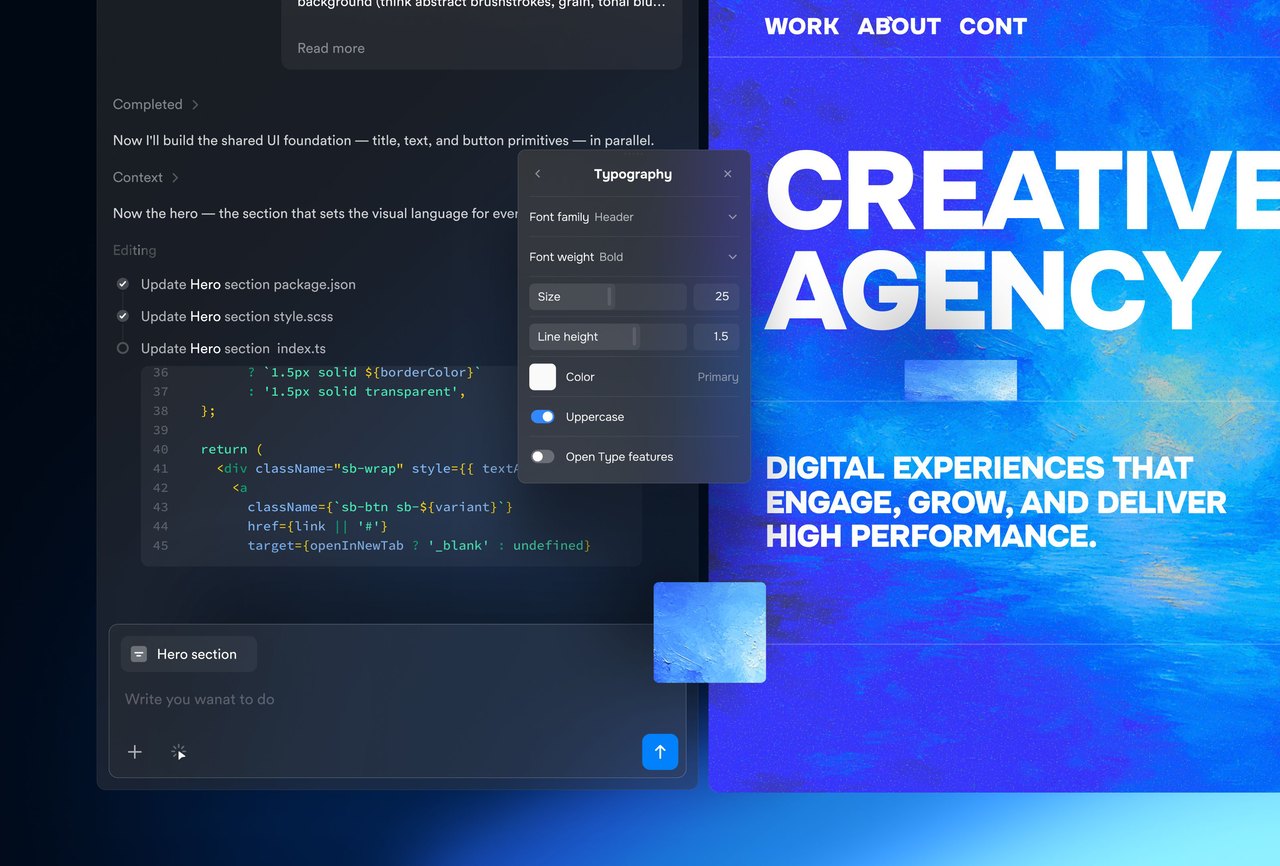
  • Onepage Agent - An AI agent in your account that works alongside you
  • Element generation - Ask for a component the builder doesn't have, and it lands in your section as a regular element. It writes React and runs on the best models
  • Section generation - The Agent writes a full section matching the page's style, while surrounding sections stay regular builder sections
  • Page generation - The Agent builds the whole page in code, section by section — a normal Onepage project with your domain, integrations, and GDPR setup
  • Settings panel for generated code - Generated elements get the same settings panel as no-code ones — sliders, dropdowns, color pickers. Ask for a control once, then edit without prompting
  • MCP support - Connect Claude, Cursor, Codex, and more to build in your projects with the same context the built-in Agent has. It runs on your subscription and works on no-code pages too

Improvements

  • Copy generated elements between pages
  • Builder elements and generated elements work on the same page, and both stay editable
  • Works with any site ever created in Onepage, no updates needed
  • Onepage Agent replaces all earlier AI features
June 21, 2026

Editor, forms & site fixes

Bug fixing

  • Fixed several element issues — full-size images no longer spill past their section borders, custom shadows now render on Gallery elements, and a corner radius of 0 correctly resets corners on Items media and image-background elements
  • Fixed number alignment in List elements, and Toggle lists expanding the wrong item after you reorder them
  • Fixed the Button "Choose modalbox" dropdown opening as a thin white strip, and duplicate labels on the Icon element's two color pickers
  • Fixed AI-generated lists adding an extra empty draft item
  • Fixed form issues — sections now convert to a form when you add a form field, date pickers open on the first click, and the German webhook submit-button label is corrected
  • Fixed builder stability issues — a false "you are offline" error after your laptop wakes from sleep, number keys acting as shortcuts instead of typing in the code editor, link-settings dropdowns not applying in Safari, and a template that created an empty project when remixed
  • Fixed Wistia videos failing to load, and muted Wistia videos playing with sound when navigating through the menu
  • Fixed the navigation menu icon overlapping the CTA button on smaller screens
  • Fixed text formatting not applying reliably to text added in email templates
  • Fixed extra editor seats showing yearly instead of monthly billing in your profile
  • Fixed redirect issues — CSV export shows the real hit count, the path field no longer re-adds a leading slash or jumps your cursor to the end, and 301 redirect settings link to the help article
  • Fixed Google Tag Manager click events not firing without extra custom code, and analytics breaking after you delete analytics data
  • Fixed duplicated pages, sections, and sites showing extra "ghost" elements that weren't in the original
  • Fixed the "skip to content" link — it's now translated to your site's language and no longer appears in Google search snippets
June 8, 2026

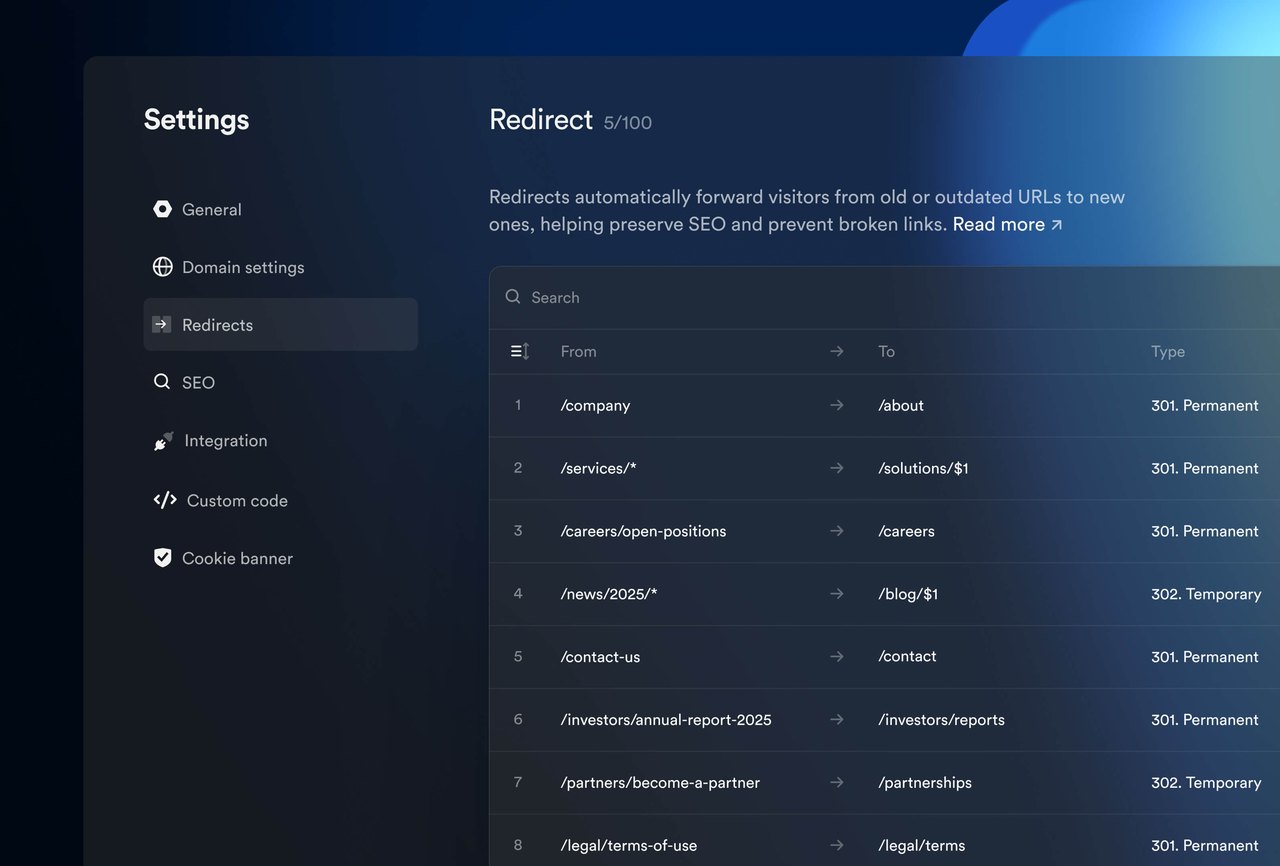
URL redirects

URL redirects

New features

  • URL redirects - Manage all your redirects from one table in project settings — source, destination, type, and live hit counts
  • Permanent or temporary - Choose a permanent (301) or temporary (302) redirect for each rule
  • Wildcard redirects - Redirect whole groups of URLs with a single rule
  • Priority ordering - Rules run top to bottom; drag to reorder or set any redirect to a fixed position
  • Bulk actions - Move several redirects to the top or bottom at once
  • Enable or disable - Switch a redirect off without deleting it
  • Conflict detection - Onepage flags overlapping rules and unreachable destinations before they cause problems
  • CSV import & export - Back up or migrate your full list, or a filtered subset, with a guided template and validation
  • Automatic redirects on slug changes - Change a page URL and Onepage offers to create the matching redirect, keeping your SEO intact
  • Redirect analytics - Track redirect traffic week over week, and daily hits per rule to spot the ones you can retire
June 5, 2026

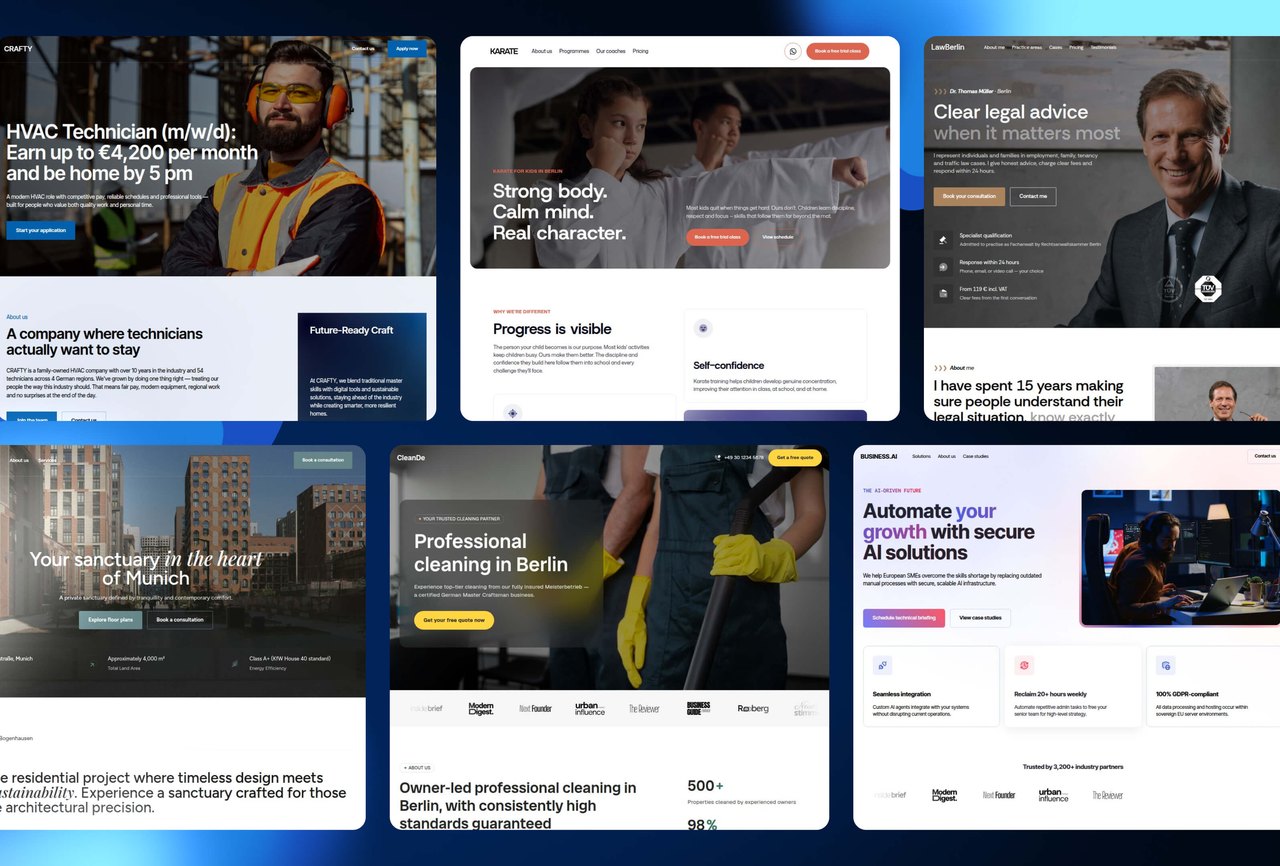
Seven new templates

Seven new templates

New features

  • Seven new templates - Landing pages for solar, cleaning, careers, real estate, AI for business, kids' clubs, and law practices
  • Fresh design - A brand-new visual system with distinctive palettes, modern typography, and refined layouts
  • Multi-step forms - Quiz-style lead capture flows you can adapt to nearby niches
  • Conversion-focused sections - Testimonials, FAQ, pricing, and case studies tuned for lead generation
  • Flexible blocks - Rearrange or repurpose sections for adjacent offers without rebuilding
  • Five localizations - International English, US English, German, Spanish, and Ukrainian
May 29, 2026

Custom font upload

Custom font upload

New features

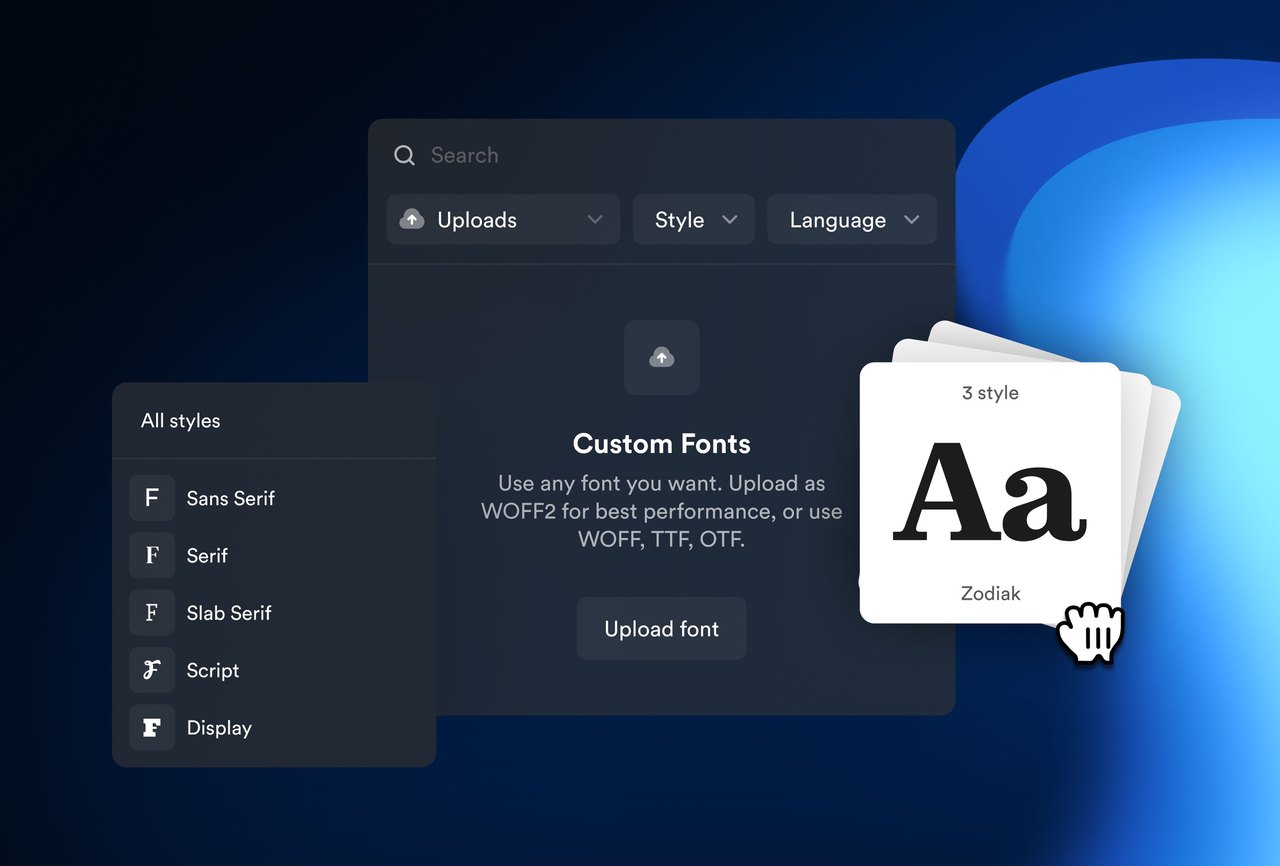
  • You can now upload your own font files and use them on your site, right alongside Google Fonts
  • Bring in WOFF2, WOFF, TTF, or OTF — add the whole family in one go
  • We sort your uploads by family and line up every weight automatically
  • Pick any uploaded font from your typography set — ready to use right away
  • Ideal for agencies and freelancers building brand-accurate sites
May 20, 2026

Accessibility upgrade

New features

  • Section roles - Mark sections as Header, Main, or Footer in the editor. Onepage wraps them in proper HTML landmarks so screen readers can navigate.
  • Multiple sections can share the same role — e.g., an announcement strip plus a menu render as a single Header.
  • Skip to content link - A "Skip to main content" link appears when keyboard users press Tab, jumping past the navigation.
  • Accessible templates - A new category in the template gallery, with around 10 templates pre-built to WCAG 2.1 AA
  • Each ships with proper landmark structure, AA color contrast, logical heading order, and image alt text — available for English and German markets

Improvements

  • Screen reader support: icon-only buttons get text labels, background and decorative images get correct alt text, the current menu page is announced
  • Keyboard navigation: every menu item is reachable by Tab, click-only divs render as real buttons or links, hover effects also trigger on focus
  • Visible focus indicators on every interactive element — buttons, links, form fields, OTP, date pickers, range sliders, video play, modals, cookie settings
  • Form accessibility: labels are tied to inputs, validation errors are announced, required fields are marked, multi-step forms move focus to the next step
  • Custom widgets brought to WCAG 2.1 AA — select, range slider, checkbox list, switch, consent, rating, date picker, file upload
  • Modals trap focus, close on Escape, and announce themselves as dialogs — same for the cookie banner and edit-cookies dialog
  • Semantic page structure: published pages render proper <header>, <main>, <footer> landmarks instead of generic divs
  • Reduced-motion respect: when a visitor turns animations off in their OS, Onepage animations honor it — including counters in Number and Stats
  • Number, Stats, Slider, and Marquee elements brought to the same accessibility baseline as the rest of the builder

Bug fixing

  • Fixed pinch-to-zoom being blocked on mobile, so visitors with low vision can now enlarge content on any published page
May 13, 2026

Forms, builder & element fixes

Improvements

  • Short Text form fields can now be aligned left, center, or right — matching the options already available for Long Text

Bug fixing

  • Fixed several form field issues — content from URL parameters now fills fields, long submit-button text wraps instead of overflowing, Number fields accept 0 and stay visible in the "1000" format, and file upload fields display correctly on dark backgrounds
  • Fixed form logic and funnel tracking — logic setup is no longer blocked after detaching a step, and funnel analytics counts every path with the full step count shown from the start
  • Fixed animations missing from Bento and Grid items with solid or outline frames, and from transparent and outline buttons
  • Fixed Stats elements — Ring, Donut, and Half-donut now show accurate proportions, keep their alignment on mobile and narrow columns, and preview only the selected element
  • Fixed media elements — Wistia videos play on published sites, the Before/After element no longer shows the second image bleeding through, and Image titles and subtitles keep their custom text size
  • Fixed the editor becoming unresponsive when editing prices in a List element or scrolling certain pages, and "Move down" not moving layouts in the left-hand menu
  • Fixed builder visual glitches — layout elements keep their background color with a "Scroll-to" link, the burger menu respects a 0 corner radius, the "Move to folder" popup no longer turns turquoise, and the folder archive dialog wording is corrected
  • Fixed publishing issues — overlay headers now show their background on scroll, pages with a legacy quiz load fully, and the domain connection "Next step" button stays reachable at 125% zoom
  • Fixed mobile issues — mega menus with a linked image no longer redirect instantly, and embedded YouTube videos no longer cause horizontal scrolling
  • Fixed CRM and Analytics issues — country flags match the correct countries, and dates stay in your language after a page reload
  • Fixed text cut off or overlapping in German, French, and Spanish — domain settings labels, the connection-guide link, the CRM lead status, and the profile name validation message
  • Fixed AI issues — the "Prompting Guide" link now opens the help article, and Number element prefixes and suffixes are translated when translating a section
April 20, 2026

Inner pages for multi-page sites

New features

  • Inner pages for multi-page sites - Build full multi-page projects inside Onepage
  • Until now the library only covered landings and one-pagers
  • 19 ready-made inner pages - About us, Case study, Product details, Article, Service details, Booking, Contact, Careers, Legal document, and more
  • Alternative versions for About us, Case study, and Product details — v1 and v2, pick the layout that fits
  • Single visual system - Inner pages share the design language of the main library, so multi-page projects still feel like one site
  • Available in every regional library - English, German, US, Ukrainian, and Spanish — each with full local adaptation
April 10, 2026

Five new design elements

New features

  • Number - Animated number display with prefix/suffix, unit support, and multiple layouts. Counts up automatically as visitors scroll
  • Stats - Data visualization with Donut, Half-donut, Ring, and Progress bar layouts — auto-calculated and fully customizable
  • Before/After Slider - Image comparison slider with drag or hover interaction and a customizable divider — perfect for redesigns and transformations
  • Slider - New row slider with transition effects (Fade, Scale), navigation arrows, pagination, infinite loop, and autoplay
  • Marquee - Smooth infinite-loop marquee for logos, partners, or testimonials — with adjustable speed, direction, fade effects, and pause on hover
  • Now built into every template - The five new elements are integrated across all content libraries (English, German, US, Ukrainian, Spanish) — in section templates, page templates, and inner pages
March 24, 2026

Version History

New features

  • Automatic version history - Every publish and every AI-generated change saves a new version automatically — no setup needed
  • One-click restore - Browse a page's timeline and roll back to any earlier version with one click. Your current state is safely backed up first
  • Live version indicator - Instantly see which version is currently published
  • Per-page timeline - Each page has its own version timeline, so reverts don't affect anything else
March 18, 2026

Spanish content library

New features

  • Spanish content library - 49 templates ready to use, in the same design language as the English, German, US, and Ukrainian libraries
  • Full localization for Spanish-speaking markets - Products, visuals, names, and tone adapted for local audiences — not just translated
March 11, 2026

Security, SEO & broad fixes

Improvements

  • Stronger security headers (HSTS, CSP, X-Frame) on all published sites
  • Smoother authentication: clearer password-recovery messaging, automatic cleanup of expired Google connections, and a fix that keeps you logged in after changing your password
  • SEO: alt text from the media library now correctly applies to your site, deleted images no longer linger in the ALT-text panel, and pages with correct settings are now properly indexable
  • Meta Events: Pixel and CAPI events now deduplicate, and the email parameter is included for better attribution
  • Domain-connected confirmation email now includes a "Visit your site" link, plus help-center guides linked from custom email sender setup

Bug fixing

  • Fixed order button not responding on the published checkout page, blocking customers from completing purchases
  • Fixed several issues causing AI page and website generation to get stuck or fail to start
  • Fixed cookie banner getting stuck in scanning state and old cookies being stuck in the list
  • Editors can now open file attachments in the CRM
  • Fixed datepicker entries being cleared when navigating back a form step
  • Fixed issues with form analytics deletion
  • Fixed Brevo integration where file uploads blocked email sending
  • Fixed several mega menu issues — visibility on hover, cropped options, working on subpages of global sections, and highlight alignment
  • Fixed issues with renaming modals (pop-ups)
  • Fixed Mailgun custom sender setup
  • Fixed domain names with German special characters displaying incorrectly
  • Fixed analytics occasionally showing data from the wrong project
  • Fixed Wistia controls being shown for "Button" and "Cover image" modes when controls were disabled
  • Smaller polish across CRM, forms, URLs, integrations, and email templates
February 17, 2026

Form archive, session security & various fixes

New features

  • Archive forms in CRM lead lists - Hide unused or deleted forms from the lead-list form picker, with a separate Archive tab and one-click restore

Improvements

  • Sessions are now invalidated everywhere when you change your password, reset your password, or change your email
  • File links in CRM email notifications now stay valid for longer

Bug fixing

  • Fixed checkout summary not reflecting the discounted total when a discount code was applied
  • Fixed broken provider guide links in the domain connection wizard
  • Fixed custom 404 pages not being served on URLs with multiple subpath levels
  • Fixed multiple submit clicks creating duplicate CRM records
  • Fixed date pickers returning unreadable values when used in form queries
  • Fixed authorization page not validating empty inputs and showing unclear errors on failed submissions
  • Fixed Google OAuth button getting stuck in a loading state after navigating back
  • Fixed Firefox editor becoming unresponsive after changing element distances
  • Fixed saved custom email senders disappearing after page refresh
  • Fixed YouTube embeds not working when the link included URL parameters
  • Smaller polish across the Stripe payment form, custom domain inputs, contact settings icons, datepicker layout, email validation, and form step language
February 5, 2026

SSL, domains & editor fixes

Bug fixing

  • Fixed Google Search Console actions silently failing when the connection had expired — you now get a clear prompt to reconnect Google instead
  • Fixed SSL certificate issues on some custom domains that previously caused browser security warnings
  • Fixed duplicate "Remove old CNAME" entries appearing in the domain assistant
  • Fixed grid containers being duplicated when copying certain pages
  • Fixed project visibility issues
January 23, 2026

Page unlock, HubSpot & Quentn updates

New features

  • Force unlock pages - Regain access when a page is stuck in editing mode by someone else, no more waiting or contacting support
  • Modern HubSpot integration - New OAuth-based connection method, aligned with HubSpot's current Developer Platform
  • Quentn tags for leads - Pick tags from your Quentn account and automatically apply them to leads from form submissions

Bug fixing

  • Fixed Wistia video controls being shown despite being disabled in Wistia settings
  • Fixed gallery not being swipeable in fullscreen view on mobile
  • Fixed font width settings not applying to items elements
  • Fixed Firefox mega menu not appearing on hover
  • Fixed inconsistent left/right arrow navigation in gallery slider
December 23, 2025

AI dark themes, tracking & forms fixes

Improvements

  • Improved AI dark theme generation with better contrast, consistent styling, and properly visible icons
  • UTM and campaign tracking parameters now captured on any page, not just the homepage
  • Builder canvas auto-scales on narrow screens so the design always reflects the published layout
  • The redesigned Builder UI is now the default for new accounts

Bug fixing

  • Fixed query parameters being stripped from links that have tracking events attached
  • Fixed query parameters lost when URLs with trailing slashes are redirected (affects Meta Ads URLs)
  • Fixed 500 error when undoing the deletion of the last element on a newly created page
  • Fixed several SSL certificate issues affecting custom domains, including auto-renewal failures and TXT-record parsing edge cases
  • Fixed pages going blank when scrolling on iPhone (iOS 18+)
  • Fixed form blueprints and step templates being limited to a single use — you can now reuse the same layout multiple times
  • Fixed Polish form templates not appearing while other languages worked
  • Fixed scroll-to-top not triggering on each step of forms inside modals